Use this file to discover all available pages before exploring further.
This guide will cover how to log LLM calls to LangSmith when you are using a custom model or a custom input/output format. To make the most of LangSmithβs LLM trace processing, you should log your LLM traces in one of the specified formats.LangSmith offers the following benefits for LLM traces:
Rich, structured rendering of message lists
Token and cost tracking per LLM call, per trace and across traces over time
If you donβt log your LLM traces in the suggested formats, you will still be able to log the data to LangSmith, but it may not be processed or rendered in expected ways.If you are using LangChain OSS to call language models or LangSmith wrappers (OpenAI, Anthropic), these approaches will automatically log traces in the correct format.
The examples on this page use the traceable decorator/wrapper to log the model run (which is the recommended approach for Python and JS/TS). However, the same idea applies if you are using the RunTree or API directly.
When tracing a custom model or a custom input/output format, it must either follow the LangChain format, OpenAI completions format or Anthropic messages format. For more details, refer to the OpenAI Chat Completions or Anthropic Messages documentation. The LangChain format is:
inputs = { "messages": [ { "role": "user", "content": [ { "type": "text", "text": "Hi, can you tell me the capital of France?" } ] } ]}outputs = { "messages": [ { "role": "assistant", "content": [ { "type": "text", "text": "The capital of France is Paris." }, { "type": "reasoning", "text": "The user is asking about..." } ] } ]}
Converting custom I/O formats into LangSmith compatible formats
If youβre using a custom input or output format, you can convert it to a LangSmith compatible format using process_inputs/processInputs and process_outputs/processOutputs functions on the @traceable decorator (Python) or traceable function (TS).process_inputs/processInputs and process_outputs/processOutputs accept functions that allow you to transform the inputs and outputs of a specific trace before they are logged to LangSmith. They have access to the traceβs inputs and outputs, and can return a new dictionary with the processed data.Hereβs a boilerplate example of how to use process_inputs and process_outputs to convert a custom I/O format into a LangSmith compatible format:
Show the code
class OriginalInputs(BaseModel): """Your app's custom request shape"""class OriginalOutputs(BaseModel): """Your app's custom response shape."""class LangSmithInputs(BaseModel): """The input format LangSmith expects."""class LangSmithOutputs(BaseModel): """The output format LangSmith expects."""def process_inputs(inputs: dict) -> dict: """Dict -> OriginalInputs -> LangSmithInputs -> dict"""def process_outputs(output: Any) -> dict: """OriginalOutputs -> LangSmithOutputs -> dict"""@traceable(run_type="llm", process_inputs=process_inputs, process_outputs=process_outputs)def chat_model(inputs: dict) -> dict: """ Your app's model call. Keeps your custom I/O shape. The decorators call process_* to log LangSmith-compatible format. """
When using a custom model, it is recommended to also provide the following metadata fields to identify the model when viewing traces and when filtering.
ls_provider: The provider of the model, eg βopenaiβ, βanthropicβ, etc.
ls_model_name: The name of the model, eg βgpt-4o-miniβ, βclaude-3-opus-20240229β, etc.
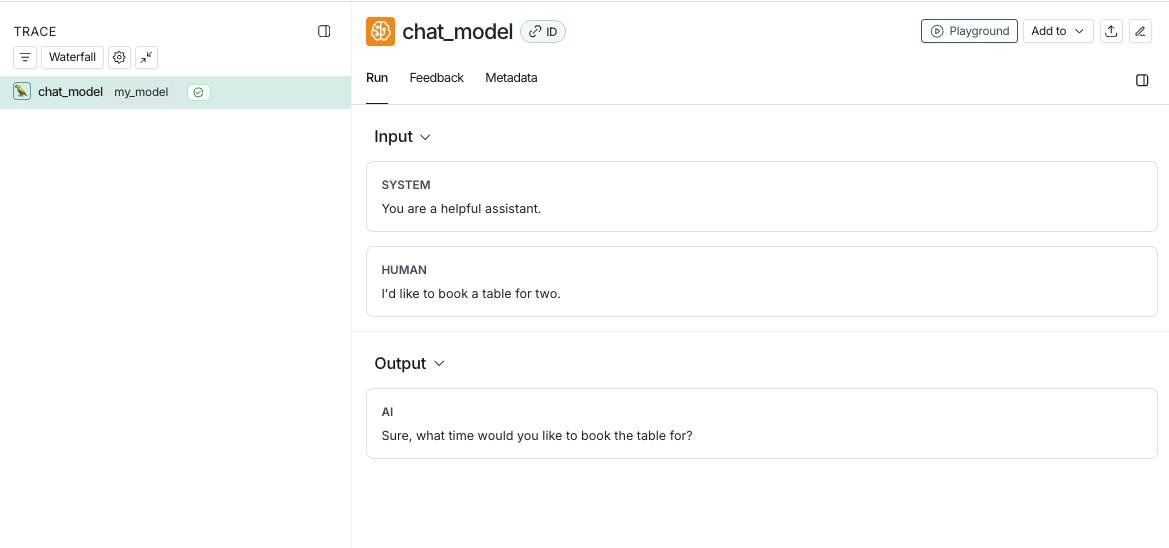
from langsmith import traceableinputs = [ {"role": "system", "content": "You are a helpful assistant."}, {"role": "user", "content": "I'd like to book a table for two."},]output = { "choices": [ { "message": { "role": "assistant", "content": "Sure, what time would you like to book the table for?" } } ]}@traceable( run_type="llm", metadata={"ls_provider": "my_provider", "ls_model_name": "my_model"})def chat_model(messages: list): return outputchat_model(inputs)
This code will log the following trace:
If you implement a custom streaming chat_model, you can βreduceβ the outputs into the same format as the non-streaming version. This is currently only supported in Python.
def _reduce_chunks(chunks: list): all_text = "".join([chunk["choices"][0]["message"]["content"] for chunk in chunks]) return {"choices": [{"message": {"content": all_text, "role": "assistant"}}]}@traceable( run_type="llm", reduce_fn=_reduce_chunks, metadata={"ls_provider": "my_provider", "ls_model_name": "my_model"})def my_streaming_chat_model(messages: list): for chunk in ["Hello, " + messages[1]["content"]]: yield { "choices": [ { "message": { "content": chunk, "role": "assistant", } } ] }list( my_streaming_chat_model( [ {"role": "system", "content": "You are a helpful assistant. Please greet the user."}, {"role": "user", "content": "polly the parrot"}, ], ))
If ls_model_name is not present in extra.metadata, other fields might be used from the extra.metadata for estimating token counts. The following fields are used in the order of precedence:
metadata.ls_model_name
inputs.model
inputs.model_name
To learn more about how to use the metadata fields, refer to the Add metadata and tags guide.
If you are using traceable or one of our SDK wrappers, LangSmith will automatically populate time-to-first-token for streaming LLM runs.
However, if you are using the RunTree API directly, you will need to add a new_token event to the run tree in order to properly populate time-to-first-token.Hereβs an example:
from langsmith.run_trees import RunTreerun_tree = RunTree( name="CustomChatModel", run_type="llm", inputs={ ... })run_tree.post()llm_stream = ...first_token = Nonefor token in llm_stream: if first_token is None: first_token = token run_tree.add_event({ "name": "new_token" })run_tree.end(outputs={ ... })run_tree.patch()